How to create a New Apple ID


How to create a New Apple ID


How to create a new Apple ID

Use the same Apple ID to enjoy all Apple services. Find out how to create one.
Highlight Code
If you use Apple services, you already have an Apple ID and don't need to create a new one. Learn how to sign in, manage, and protect your account. Not sure if you have one? To find your Apple ID, enter your name and email address on the Apple ID account page.
An Apple ID is the account you use to access Apple services like iCloud, the App Store, the iTunes Store, Apple Music, and more. It includes the email address and password that you use to sign in, and all the contact, payment, and security details that you'll use across Apple services.
No matter where you create your Apple ID, just remember to use the same one to sign in to every Apple service. That way, you can access and manage everything with a single account and password.
Store availability and features might vary by country or region.

Create an Apple ID on your iPhone, iPad, or iPod touch

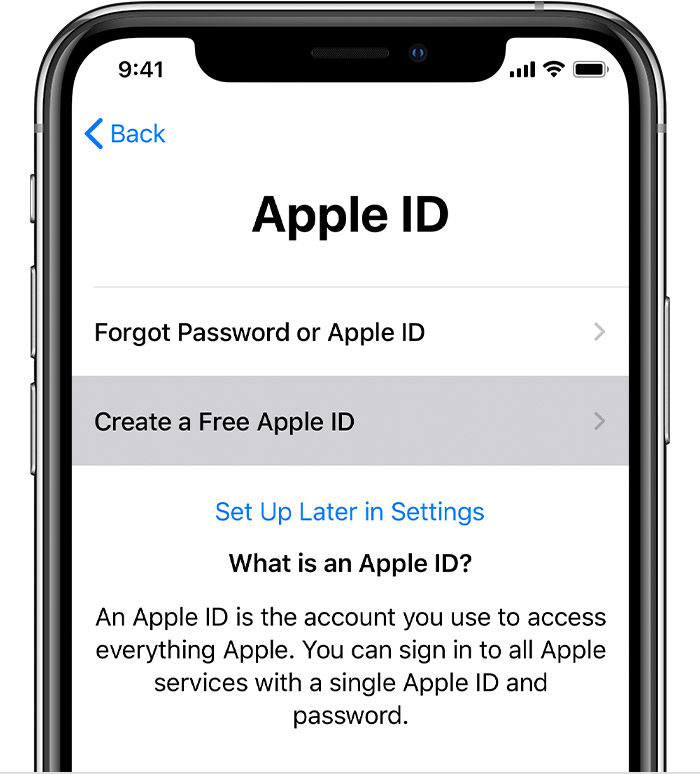
When you set up on your new iPhone, iPad, or iPod touch, you might be asked to enter your Apple ID and password. If you don't have an Apple ID, you can create a new one when you set up your device. You can also set it up later in the App Store.

Create an Apple ID when you set up your device

  1. Tap Forgot password or don't have an Apple ID.
  2. Tap Create a Free Apple ID.
  3. Select your birthday and enter your name. Tap Next.
  4. Tap Use your current email address, or tap Get a free iCloud email address.

Create an Apple ID using the App Store on your device

  1. Open the App Store and tap your profile picture .
  2. Tap Create New Apple ID. If you don't see this option, make sure you're signed out of iCloud.
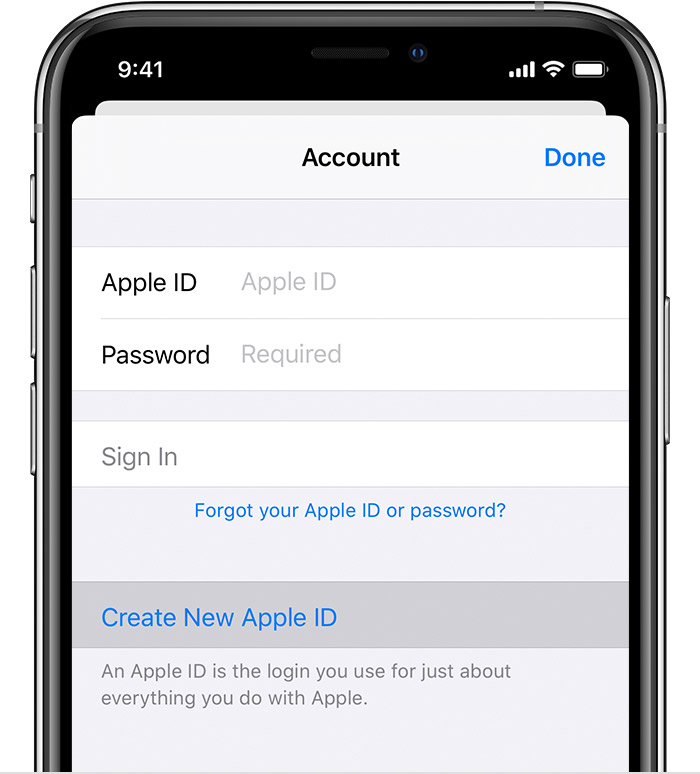
  3. Enter your email, password, and choose the country or region that matches the billing address for your payment method. The email address you provide will be your new Apple ID.*
  4. Read the Terms and Conditions and Apple Privacy Policy, then tap Agree to Terms and Conditions. Tap Next.
  5. Enter your name and birthday, then tap to subscribe to Apple Updates if you'd like. This keeps you up to date on the latest news, software, products, and services from Apple. Tap Next.
  6. Enter your credit card and billing information, then tap Next. You can also choose None, and learn what to do if None isn't showing or you can't select it. You will not be charged until you make a purchase. You can change or remove your payment details later.
  7. Confirm your phone number. This can help to verify your identity and recover your account if needed. Tap Next.
  8. Check your email for a verification email from Apple and follow the steps to verify your email address. Learn what to do if you need to set up email on your iPhone, iPad, or iPod touch.
After you verify your email address, you can use your Apple ID to sign in to the iTunes Store, App Store, and other Apple services such as iCloud.
Create an Apple ID on your computer
On your Mac, you can create an Apple ID using the App Store. If you use a Windows PC, you can create an Apple ID using iTunes for Windows. If you don't have iTunes for Windows, you can create an Apple ID on the web.

Create an Apple ID on your Mac

  1. Open the App Store.
  2. Click Sign In, then click Create Apple ID. If you don't see this option, make sure you're signed out of iCloud.
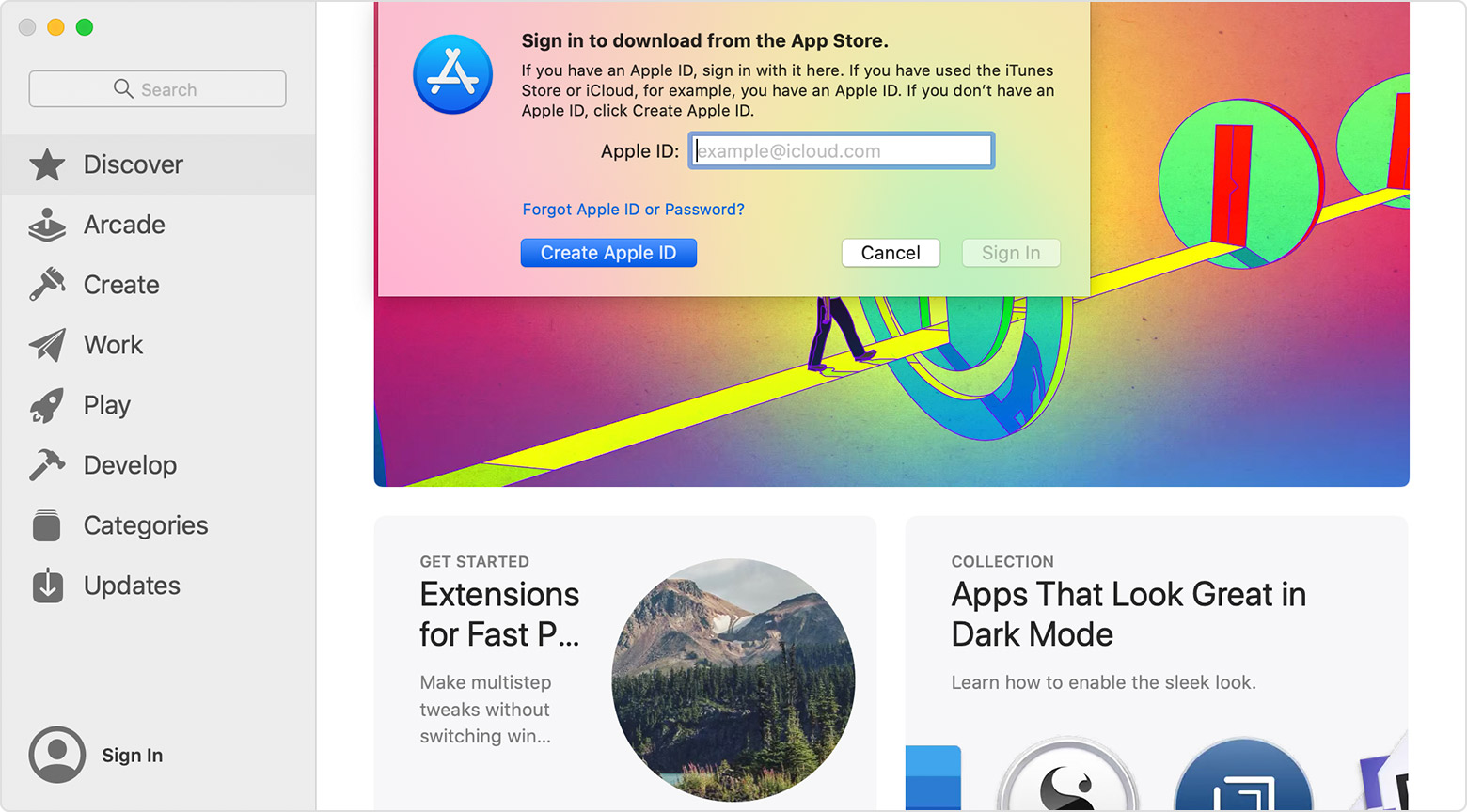
  3. Read and agree to the Terms and Conditions.
  4. Complete the form to create your new Apple ID. The email address you provide will be your new Apple ID.
  5. After you've filled out the form, click Continue. If you see a message that says that the email address you entered is already associated with an Apple ID, follow these instructions to use an existing Apple ID instead.
  6. Enter your credit card and billing information, then click Continue. You can also choose None, and learn what to do if None isn't showing or you can't select it. We'll charge you only when you make a purchase. You can change or remove your payment details later.
  7. Check your email for a verification email from Apple and follow the steps to verify your email address.

After you verify your email address, you can use your new Apple ID to sign in to the App Store and other Apple services such as iCloud.

Create an Apple ID on your Windows PC

  1. Open iTunes for Windows. Make sure that you have the latest version.
  2. From the menu bar at the top of your computer screen or at the top of the iTunes window, choose Account > Sign In. Then click Create New Apple ID.
  3. Read and agree to the Terms and Conditions and Apple Privacy Policy.
  4. Complete the form to create your new Apple ID. The email address you provide will be your new Apple ID. The form also includes security questions for your protection.
  5. After you've filled out the form, click Continue. If you see a message that says that the email address you entered is already associated with an Apple ID, follow these instructions to use an existing Apple ID instead.
  6. Enter your credit card and billing information, then click Continue. You can also choose None, and learn what to do if None isn't showing or you can't select it. We'll charge you only when you make a purchase. You can change or remove your payment details later.
  7. Check your email for a verification email from Apple and follow the steps to verify your email address.

Create an Apple ID on another device

To create an Apple ID on an Apple TV, Android device, smart TV, or streaming device, you can usually follow the steps provided onscreen and enter your full name, date of birth, an email address or phone number, and a payment method. You need to create an Apple ID when you subscribe to services like Apple Music and Apple TV+, or when you download the Apple TV app. If you set up the Apple TV app on your smart TV and need to create an Apple ID, you might be redirected to activate.apple.com.
If you have trouble, try using the steps below to create your Apple ID on the web.
  1. Go to the Apple ID account page and click Create your Apple ID.
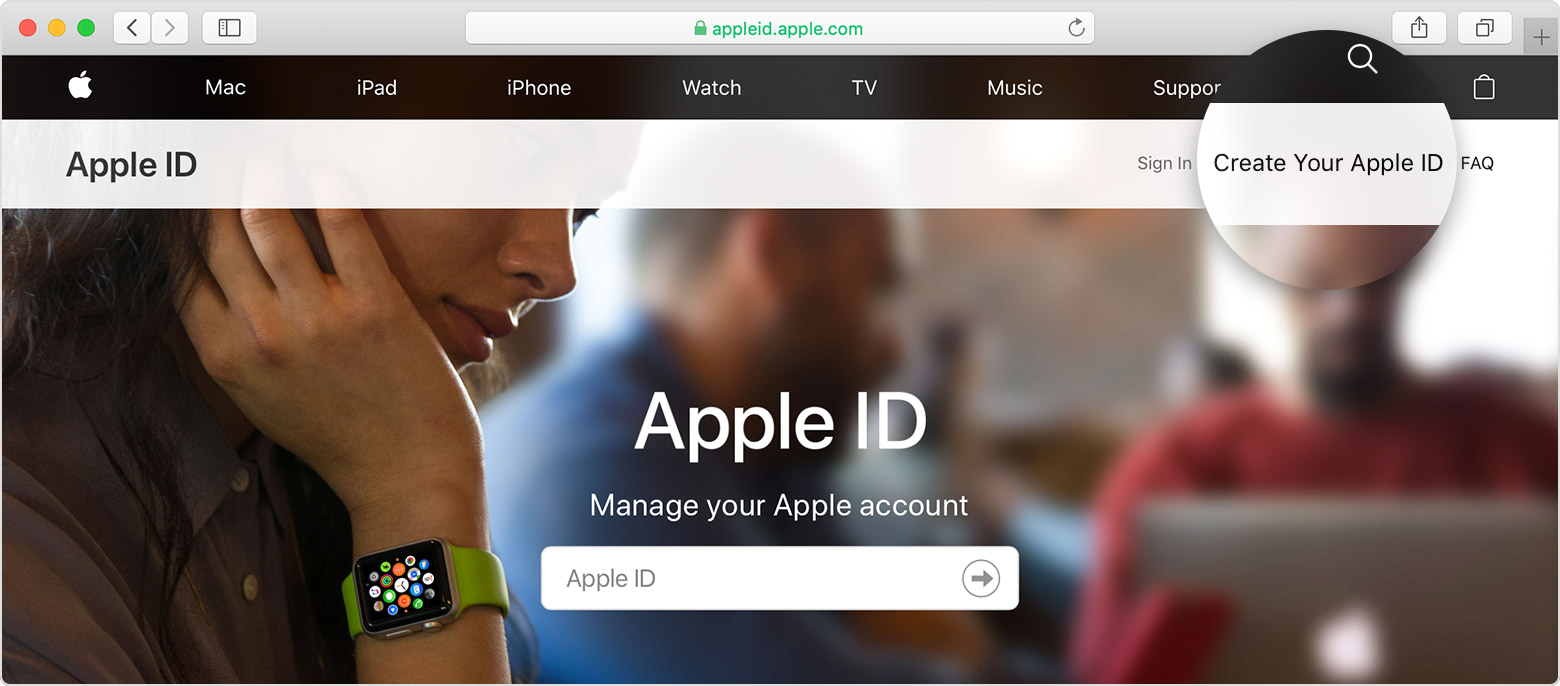
  2. Enter your name, birthday, email, password, and choose the country or region that matches the billing address for your payment method. The email address you provide will be your new Apple ID.*
  3. Select your security questions, and then check the boxes to subscribe to Apple Updates if you'd like. This keeps you up to date on the latest news, software, products, and services from Apple.
  4. Click Continue.
After you create your Apple ID on the web, you can upgrade to Apple's highest level of security, two-factor authentication, if you're eligible. After you verify your email address, you can use your new Apple ID to sign in to the iTunes Store and other Apple services such as iCloud.

Comments

Popular Posts

Huawei P30 Pro Price In Bangladesh

P30 PRO Price in Bangladesh Official  ✭ ৳89,999 Unofficial – Huawei P30 Pro Full Specifications First Release March 2019 Colors Breathing Crystal, Aurora, Black, Amber Sunrise, Pearl White   Connectivity Network 2G, 3G, 4G support ✅ SIM Hybrid Dual Nano SIM WLAN ✅ dual-band, Wi-Fi direct, Wi-Fi hotspot Bluetooth ✅ v5.0, A2DP, LE, aptX HD GPS ✅ A-GPS, GLONASS, BDS, GALILEO, QZSS Radio  ✖ USB v3.1 OTG ✅ USB Type-C ✅   Body Style Full-View Minimal Notch Material Glass front & back Water Resistance ✅ IP68 dust and waterproof Dimensions 158 x 73.4 x 8.4 millimeters Weight 192 grams   Display Size 6.47 inches Resolution Full HD+ 2340 x 1080 pixels (422 ppi) Technology OLED Touchscreen Protection ✅ Features Multitouch, HDR10, Wide Color Gamut (DCI-P3)   Back Camera Resolution Triple 40+16+8 Megapixel (with an extra TOF camera) Features Wide, Ultra Wide & Telephoto Lens, f/1.6, f/2.2 & f/...

Best Photo Editor in 2019(You can't imagine it, what can it do) photo lab picture editor

                      Photo Lab Picture Editor: face effects, art frames  Download Link:   https://play.google.com/store/apps/details?id=vsin.t16_funny_photo SCREENSHOTS About This App Photo filters, picture frames, effects, collages & montage for quick touch-ups Photo Lab boasts one of the vastest collections of stylish and funny photo effects: more than 900 effects to date! Fantastic face photo montages , photo frames, animated effects, and photo filters are here for you to enjoy. Make your image look creative in seconds without using a professional editor and set it as a contact icon, a wallpaper, send a signed virtual postcard to a friend or share it to any social network. App’s foremost features include: ☆ Neural Art Styles : a new smart (and quick) way to turn any photo into an artwork - choose from over 50 pre-set styles. ☆ Photo frames : choose one of our beau...

Google Pixel 4 Review 2019 By Sourav Ghose

Google Pixel 4 review Introduction It wasn't with much excitement that we met the reveal of the Pixel 4 duo - Google's lack of effort to contain early leaks meant that not only were the specs unremarkable, but we also knew them in advance. We already had the  4 XL for review  and we have more than a general idea of this gen's pros and cons, but now we set out to discover how the small Pixel 4 performs and how it stands in the context of its own specific competitors. The Pixel 4 is essentially the same phone as the 4 XL, only scaled down in a couple of ways - display and battery. Where the XL packs a 6.3-inch QHD+ panel, the small phone stays at 5.7 inches (FullHD+ resolution, but that's fine at this size). Both are OLEDs too. Then there's battery - if the XL's 3,700mAh capacity sounded on the meh side of okay, the 2,800mAh figure in the Pixel 4 specsheet is downright worrisome. The rest is all the same. The soon-to-be-replaced springtime Qualcomm top...

10 Best Free Android Apps You must Have to Download

10 Best Free Android Apps You must Have to Download  Android’s leading strength is its app ecosystem. There are a digital ton of Android apps. Both technical and non-technical people download them billions of times. Some of them are cost-effective and some of them are not. More often than not, the best apps will cost you some bucks. However, there are a lot of incredible options that don’t cost you. These services are typically supported by online advertising, business sponsorships or some other sort of financial planning. Here’s your prospect to stock up on some beyond doubt exceptional stuff. These are the best free Android application available which are the finest of all time, so most of these should not astonish you. Why Some of the Android apps have Turned as an Essential Part of our Lives So here we are, ladies and gentlemen, with a unique list of top Free Android Apps that stand at the top of the pantheon. The apps that we have listed here are perme...

Vivo Y19 Mobile Price in Bangladesh with Full Specification 2019

Vivo Y19 Full Specifications VIVO Y19 Tk. 20,990 Vivo Y19 Full Specifications Name Vivo Y19 Brand Vivo Model Y19 Category Smartphone Price 20,990.00 Taka (approx) Showroom Click Here Network Network Type GSM / HSPA / LTE Network 2G GSM 850 / 900 / 1800 / 1900 - SIM 1 & SIM 2 (dual-SIM model only) Network 3G HSDPA 850 / 900 / 2100 Network 4G LTE band 1(2100), 3(1800), 5(850), 8(900), 28(700), 38(2600), 40(2300), 41(2500) Speed HSPA, LTE-A GPRS Yes EDGE Yes Launch Launch Announcement 2019, November Launch Date Available. Released 2019, November Body Body Dimensions 162.2 x 76.5 x 8.9 mm (6.39 x 3.01 x 0.35 in) Body Weight 193 g Network Sim Single SIM (Nano-SIM) or Dual SIM (Nano-SIM, Dual stand-by) Display Display Type IPS LCD capacitive touchscreen, 16M Colors Display Size 6.53 inches, 104.7 cm2 (~84.4% screen-to-body ratio) Display Resolution 1080 x 2340 pixels, 19.5:9 ratio Disp...

Huawei Y9s launched – overview, features, price

Huawei Y9s Price in Bangladesh Official  ✭ ৳29,999 Unofficial  ৳20,500 Huawei released its new phone  Huawei Y9s . The specifications of this device are very similar to the Honor 9X Pro. However, Y9s comes with Huawei’s Kirin 710F instead of 9X Pro’s Kirin 810 chipset. For those who are not familiar with the relationship between Huawei and Honor brands, Honor is a subbrand of Huawei and they both use the Kirin chipset made by Huawei. Huawei Y9s comes with 6 GB RAM and 128 GB internal storage or ROM. There is an external MicroSD slot that supports up to 512 GB. The display is a Full HD+ Max-View 6.59 inches one with a 91% screen to body ratio. The front camera is placed on top through a pop-up mechanism. The big benefit is that there is no “notch interruption” while viewing the content and pop-up camera looks stylish and unique. On the other hand, some may find the pop-up mechanism as an interruption. It is a matter of per...

Top 8 App Stores To Publish Your Apps And Get Extra Traffic & Downloads

Top 8 App Stores To Publish Your Apps And Get Extra Traffic & Downloads If I ever  develop an iOS or Android mobile app  then no doubt I would choose the Apple App Store or Google Play Store to host my first app. If you are an app developer you must be aware that,  Play Store  and  iTunes  are the largest app distribution platforms covering the huge global audience. In the past few years, these two platforms have grown such that, you can find loads of apps hosted of every kind now and then. So even if you publish your app in any one of them it is way difficult to establish a good hold and visibility amongst millions of apps. However if you need to  increase your app’s visibility  and boost your sales with better app ratings you can check out these alternative app stores which I have listed below and try to publish your app in them along with Google Play and iTunes, I’m sure this strategy will definitely increase y...

Top 5 Website Builders 2020

Best Website Builders 2019 See the website builders and choose the one that's best for your needs. Compare pricing, features and more for the leading brands Over 500 designer templates Advanced SEO and social tools Free options + premium plans Visit Site  State of the art templates Getting a website very easy Reasonably priced plans Visit Site  Large plugin library Adjustable and simple Open source and free Visit Site  Customized design assistance Prioritizing simplicity 40% Discount for the First 72hs Visit Site  Great templates for all niches Easy drag-and-drop interface Get up to 60% off Visit Site  Helping you build a website Do you want to create a website, but don’t have coding experience? We provide thorough comparisons of the most popular and successful website builders. Take a look at our ana...

XIAOMI REDMI NOTE 8 PRO GETS ELECTRIC BLUE COLOR IN INDIA

XIAOMI REDMI NOTE 8 PRO GETS ELECTRIC BLUE COLOR IN INDIA ‌ Apparently Xiaomi has chosen this week to bring new fancy colors for its succesful Redmi Note 8 series. Yesterday, the company brought the   Cosmic Purple color for the Redmi Note 8 . Today, it’s time for the Electric Blue version of the Redmi Note 8 Pro to   pop-out . It’s the very same Ocean Blue variant that debuted in China, However, for the Indian market, Redmi decided to pick an alternative name. The new color joins the other colors the Redmi Note 8 Pro is available in – Ice Emerald, Electric Light Grey and Pearl White. ‌ ‌  Join GizChina on Telegram The gradient finish definitively adds a lot of bright in the smartphone rear. According to Xiaomi’s report, the Redmi Note 8 series is running fast to become another great hit in India. The combined sales of the vanilla Note 8 and the Note 8 Pro already crossed the 1 million shipments milestone. While the stan...

Subscribe to my Newsletter